Voice Search and Local SEO: What “Near Me” Queries Actually Need
Voice Search and Local SEO: What “Near Me” Queries Actually Need Voice search local SEO is about making your business...
Read More → Voice search local SEO is about making your business the one answer a phone or smart speaker reads out when someone says “near me.” People don’t type stiff keywords anymore. They ask full questions out loud, often while walking or driving, and the assistant usually gives one or two answers instead of a page of results. To be one of those answers, you need accurate business data, clear answers in plain language, and a mobile-friendly website.
Someone typing might write “dentist Rohini.” Someone speaking will say, “Which dentist near me is open on Sunday?” The spoken version is longer, more conversational, and carries a clear need: a time, a service, a problem to solve.
That changes what you optimise for. Voice searches are mostly questions that start with who, what, where, when, or how. They also tend to have urgency attached, like “open now,” “closest,” or “can come today.” If your website only lists services in short phrases, it misses the way people actually ask.
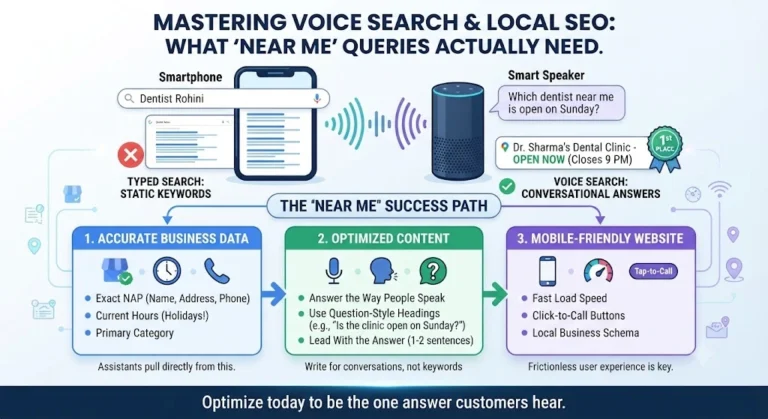
Google has said local results are based on relevance, distance, and prominence. A “near me” query leans heavily on all three, and each one needs specific work from you.
For voice search local SEO, your Google Business Profile does more work than almost anything on your website. Assistants pull address, hours, phone number, and category from it directly. Check that:
A wrong closing time is one of the quickest ways to lose a voice customer. The assistant will say it confidently, and the person will arrive at a locked door.
Your business details should read the same on your website, directories, social pages, and map listings. If one place says “Sector 12” and another says “Sec-12,” or an old phone number is still live somewhere, search engines become less sure which version is right. Less certainty means less chance of being read out.
This is where voice search local SEO content differs from ordinary service pages. Instead of only writing “Emergency AC repair,” add a section that answers the real question: “Can someone repair my AC today?” Give the answer in the first sentence, then add detail like service hours, areas covered, and what the visit involves.
Good voice content is built around questions your customers already ask on calls, in messages, and at your counter. Start there instead of with a keyword tool.
Put a short, direct answer of one or two sentences right under the question heading. Expand after that. Assistants prefer text that works as a standalone answer.
Headings like “How much time does a root canal take?” or “Is the clinic open on Sundays?” match spoken queries far better than a vague heading like “Our Treatments.”
Mention the neighbourhoods, markets, and landmarks you serve. People say “near Lajpat Nagar metro” more often than they say a formal district name. Write location details the way locals say them.
If a sentence would sound awkward read aloud, rewrite it. Short, natural lines are easier for assistants to pick up and for people to understand.
If you serve several areas, each page should carry real details about that area, not the same paragraph with a new place name pasted in.
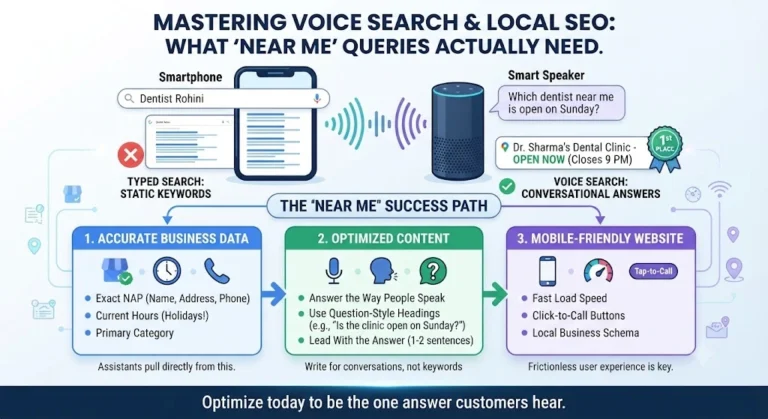
Most voice queries come from phones, so mobile experience decides a lot. A slow page, tiny buttons, or a phone number that can’t be tapped will lose the customer even if you rank well.
A few things to get right:
Some problems show up again and again:
Voice search local SEO is the practice of optimising your business so assistants like Google Assistant, Siri, and Alexa can find and read out your details when someone asks for a nearby service by speaking.
Regular local SEO targets typed phrases and a list of results. Voice search local SEO targets spoken questions and usually a single answer, so direct, conversational content and perfectly accurate business data matter even more.
They show strong intent. Someone searching “near me” usually wants to visit, call, or buy soon, so these searches often lead to real customers rather than casual browsing.
Yes. Assistants commonly rely on listing details like address, hours, phone number, and category. A complete, accurate profile gives your business a much better chance of being the answer.
Focus on full questions and natural phrases your customers use, such as “who repairs laptops near me” or “is the pharmacy open now.” Add your area and landmark names the way locals say them.
Keep the main answer short, ideally one or two clear sentences, placed right under the question. You can add more detail below it for readers who want it.
It isn’t a guarantee of ranking, but local business schema helps search engines understand your address, hours, and contact details accurately. It is a sensible technical step for any local site.
Yes. Most voice searches happen on mobile phones, and people won’t wait for a slow page. A fast, easy-to-tap site improves both visibility and the chance someone actually contacts you.
Begin by fixing your Google Business Profile, then make your contact details consistent everywhere online. After that, add a page answering the five questions customers ask you most often.
Ask your phone or smart speaker the questions your customers would ask, like “find a [your service] near me,” and see what comes back. Repeat from different areas and note whether your business is mentioned.
“Near me” queries reward businesses that are accurate, clear, and easy to reach. Keep your listing details correct, write answers the way people actually speak, and make sure your site works smoothly on a phone. Do these consistently and voice search local SEO becomes a steady source of nearby customers instead of a guessing game.
If you’d like help improving your local visibility, call 9718159724.