Voice Search and Local SEO: What “Near Me” Queries Actually Need
Voice Search and Local SEO: What “Near Me” Queries Actually Need Voice search local SEO is about making your business...
Read More → The toxic backlinks disavow process is how you tell Google to ignore harmful links pointing to your website, but it only works safely when you’ve confirmed those links are genuinely spammy and not just low-value. Toxic backlinks usually come from link farms, hacked pages, paid link networks and auto-generated spam sites, and they can weaken trust in your domain or even trigger a manual action. This guide shows you how to spot them, how to build a clean disavow file, and when it’s smarter to leave the tool alone.
Toxic backlinks are links from sites that exist to manipulate search rankings or that carry clear signs of spam. Think of pages stuffed with casino, pharma or adult links that have nothing to do with your topic, or networks of thin sites built only to pass links around.
A toxic link is not the same as a weak one. A small blog with little traffic that mentions your brand is simply low authority, and that’s normal. Spammy backlinks are different: the site has no real audience, no real content, and the link was placed to game the system.

For most websites, a toxic backlinks disavow file is unnecessary. Google has said that its systems are good at ignoring spammy links on their own, and it describes the disavow tool as an advanced feature that can hurt your site if used carelessly.
You should seriously consider it in three situations:
If none of these apply, monitoring is usually the better choice.
No single signal proves a link is toxic. Look for a combination:
A proper backlink audit is manual work backed by data. Here is a workable routine:
One caution on toxicity scores: the numbers inside SEO tools are estimates. Use them to prioritize what to check, never as the final verdict.
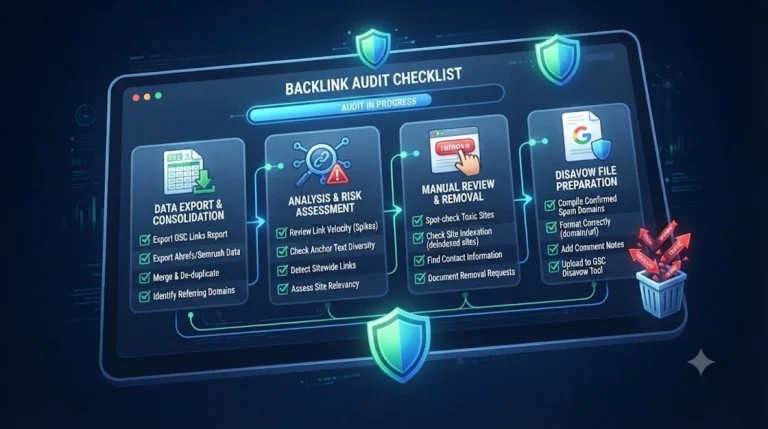
Once you’ve decided which links must go, the link disavow process through the Google Disavow Tool is simple, but the details matter.
Step 1: Create a plain text file. Save it as a .txt file in UTF-8 or 7-bit ASCII encoding.
Step 2: Use the correct format. One entry per line. Use domain: to disavow every link from a site, a full URL to disavow a single page, and a # at the start of a line for your own notes.
Step 3: Choose domain or URL level wisely. Use domain: for spam networks and junk sites. Use a specific URL only when one page is bad and the rest of the site is legitimate.
Step 4: Upload in the Google Disavow Tool. Select the correct property in Search Console and upload the file. The file can be up to 2 MB and 100,000 lines, comments included.
Step 5: Remember that an upload replaces the old file. If you’ve disavowed before, download your existing file first, add the new entries to it, and then upload the combined version.
Step 6: Be patient. Google applies the file as it recrawls the linking pages, which can take weeks. The links will still appear in reports, and that’s expected.
If you’re dealing with a manual action, submit a reconsideration request afterward, explaining which links you tried to remove and what you disavowed.
Most damage from disavowing comes from rushing. Avoid these:
Negative SEO, where someone points junk links at a competitor’s site, is uncommon, but a basic defense costs very little time:
Link profile health isn’t about having zero bad links. Every site collects some junk over time. A healthy profile has mostly relevant, editorial links, a natural mix of branded and descriptive anchors, and steady growth rather than sharp spikes. Review it on a schedule, act on real problems, and spend the rest of your effort earning good links through useful content.
It’s a way of asking Google not to count certain harmful links when assessing your site. You list the spammy domains or URLs in a text file and upload it through Google’s Disavow Tool in Search Console.
No. Low authority and toxic are different things. A link from a small, genuine site is harmless. Toxic links come from spam networks, hacked pages and sites built only for link manipulation.
Google’s systems ignore most spam links, so many sites are never affected. The real risks are a manual action for unnatural links or a pattern of manipulative links that you or an agency built.
Open the Links report in Google Search Console and export the list of linking sites. Sort by link count, look for strange domains and repeated anchors, and then check the suspicious ones by hand.
Disavow the whole domain when the site is clearly spam. Disavow a single URL when only one page on an otherwise decent site carries a bad link.
It can take several weeks, because Google applies it as it recrawls the linking pages. The links will keep appearing in reports even after they’re processed.
Yes. Remove the lines you no longer want, then upload the updated file. The change takes effect gradually as Google recrawls those links.
Treat them as a starting point only. Scores are estimates and often flag harmless links, so always review the linking page yourself before adding anything to your file
A quick monthly check for new referring domains is enough for most sites. Do a deeper audit every quarter, or right after a sudden traffic or ranking change.
That’s common, since spam is often auto-generated. Keep monitoring, add new entries to your existing file when they’re confirmed as spam, and check whether the source of the links, like a hacked page or an old agency, is still active.
Toxic backlinks are worth taking seriously, but not worth panicking over. Most sites don’t need a toxic backlinks disavow file at all, and those that do should build it only after a careful backlink audit, manual checks and an honest removal attempt. Disavow slowly, keep every version of your file, and keep watching your link profile so small problems never grow into penalties.
If you’d like help auditing your backlinks or preparing a safe disavow file, call 9718159724.