Voice Search and Local SEO: What “Near Me” Queries Actually Need
Voice Search and Local SEO: What “Near Me” Queries Actually Need Voice search local SEO is about making your business...
Read More → Your traffic graph doesn’t lie. If it’s been sliding for weeks and you can’t point to a single reason why, the problem usually isn’t your content — it’s what’s happening under the hood. Technical issues quietly choke a site’s visibility long before anyone notices, and by the time rankings visibly drop, the damage has usually been building for months.
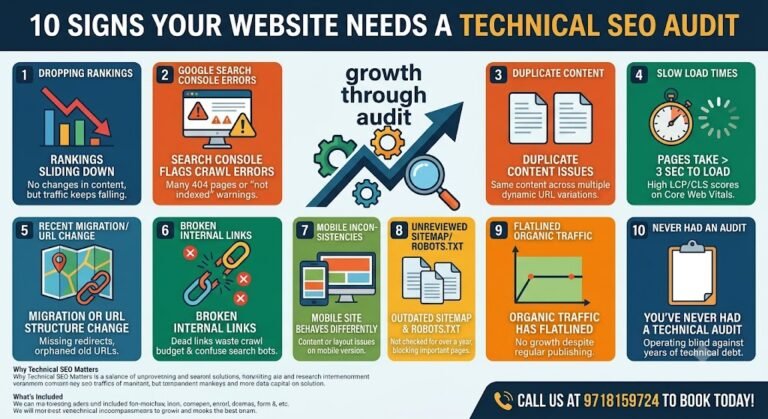
Here are the ten signs that tell you it’s time to stop guessing and get a proper technical SEO audit done.

If you haven’t touched your pages in months and rankings are still sliding, something on the technical side has shifted — a crawl issue, a broken template change, an indexing problem introduced by a developer update. Content-side SEO can’t fix a technical leak.
Open the Coverage or Pages report in Search Console. If you’re seeing a growing list of 404 errors, redirect chains, or “Discovered — currently not indexed” pages, Google is telling you directly that it’s struggling to reach or trust parts of your site.
E-commerce and multi-category sites are especially prone to this — the same product or page accessible through three or four different URLs (with and without trailing slashes, parameter versions, session IDs). Search engines split ranking signals across duplicates instead of consolidating them into one strong page.
Site speed is both a ranking factor and a conversion factor. If your Core Web Vitals report shows poor LCP or CLS scores, visitors are bouncing before the page even finishes rendering — and Google notices that behavior too.
Migrations are one of the most common causes of sudden ranking collapse. Missing redirects, broken internal links, and orphaned old URLs can undo years of SEO equity within days if the migration wasn’t audited properly.
Broken links inside your own site waste crawl budget and pass zero authority. If your navigation, footer, or blog posts are riddled with dead internal links, search engines spend less time discovering your actual valuable pages.
Google indexes mobile-first. If your mobile version has missing content, broken layouts, or elements that desktop doesn’t have, you’re effectively being ranked on a broken version of your site.
Sitemaps that still list deleted pages, or a robots.txt file accidentally blocking important sections, are silent killers. Most site owners never open these files again after launch — which is exactly why they go stale.
If you’re consistently publishing but traffic refuses to grow, it usually means new content isn’t getting indexed properly, or it’s competing against your own older pages due to weak internal linking and unclear site architecture.
If your site has been live for over a year and no one has ever run a full technical crawl — checking indexation, site structure, schema, canonical tags, and crawl budget — you’re operating blind. Most sites accumulate technical debt simply through normal growth: new pages, plugin updates, theme changes.
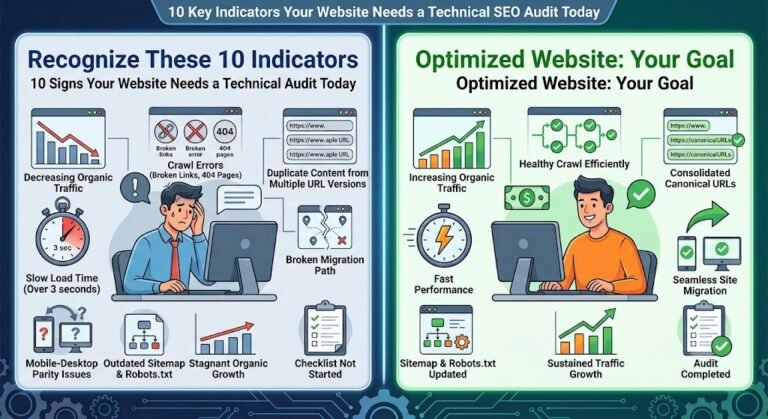
None of these problems exist in isolation. A slow site increases bounce rate, which weakens engagement signals, which affects rankings, which reduces traffic, which then gets misread as a “content problem” — so businesses pour more budget into blog posts instead of fixing the actual leak. This is exactly the cycle a Technical SEO Audit Services engagement is built to break — it maps every one of these issues on your specific site rather than treating symptoms individually.
A genuine audit goes well beyond a generic checklist tool. It should map crawlability, indexation status page-by-page, duplicate content clusters, Core Web Vitals per template type, internal link distribution, structured data implementation, and mobile parity — then prioritize fixes by actual ranking impact, not just by how many “errors” a tool flags.
Check Search Console’s Performance and Coverage reports together. If impressions are dropping alongside a rise in crawl errors or “not indexed” pages, it’s technical. If impressions are stable but clicks alone are falling, it’s more likely a content or SERP-feature issue.
For most active business websites, once every 6 months is a safe baseline. Sites that publish frequently, run on WooCommerce/Shopify, or have gone through a redesign should audit closer to quarterly.
It’s rarely a manual penalty — it’s more often a dilution problem. Google picks one version to rank and ignores the rest, so your ranking signals get split across near-identical URLs instead of strengthening one page.
Directly, a small amount — but the bigger win is crawl efficiency. Cleaning these up means search engines spend their crawl budget on pages that actually matter, which speeds up indexing for new and updated content.
A regular SEO audit often centers on keywords, content gaps, and backlinks. A technical audit focuses purely on whether search engines can crawl, render, and index your site correctly — the foundation everything else depends on.
For a small to mid-sized site, 3–5 business days is typical for the audit itself. Larger sites with thousands of URLs or complex e-commerce structures can take longer to crawl and analyze properly.
Both. Core Web Vitals are a confirmed Google ranking factor, and slow pages also increase bounce rate — which indirectly signals to Google that the page isn’t satisfying search intent.
The most common cause is missing or incorrect redirects from old URLs to new ones. Without proper 301 mapping, both users and search engines hit dead ends, and accumulated SEO authority doesn’t transfer over.
Basic fixes (broken links, missing alt text, simple redirects) are manageable in-house. But diagnosing crawl budget issues, rendering problems, or structured data errors usually needs a proper audit tool and SEO experience to interpret correctly.
You get a prioritized fix list ranked by impact and effort, not just a raw list of errors. The highest-impact, lowest-effort fixes typically get implemented first, followed by structural changes like site architecture or migration cleanup.
Every week you wait, the gap between where you rank and where you should rank gets a little harder to close. If two or more of these signs sound familiar, don’t wait for the graph to bottom out — get a proper technical SEO audit done now.
📞 Call us at 9718159724 to book your technical SEO audit today.