Voice Search and Local SEO: What “Near Me” Queries Actually Need
Voice Search and Local SEO: What “Near Me” Queries Actually Need Voice search local SEO is about making your business...
Read More → Crawl budget SEO is the practice of making sure Googlebot spends its limited crawling time on the pages that actually earn you traffic, instead of wasting it on duplicate URLs, endless filter combinations and dead ends. Crawl budget itself is the number of URLs Googlebot can and wants to fetch from your site in a given period. For a 50-page brochure site, it’s a non-issue. For an ecommerce store with hundreds of thousands of product URLs, a news archive or a marketplace, it can decide how fast a new page gets discovered, and how long an updated page keeps showing stale content in search.
Here’s what crawl budget SEO involves, when you should worry about it, where sites leak it, and how to fix the leaks.
Google describes crawl budget as the combination of two things: crawl capacity and crawl demand.
Crawl capacity (the crawl rate limit) is how much Googlebot can crawl without hurting your server. If your pages respond quickly and cleanly, the limit goes up. If the server slows down or starts returning 5xx errors or 429 responses, Googlebot backs off. That’s why server health is part of the budget conversation, not a separate topic.
Crawl demand is how much Google wants to crawl. Popular URLs, fresh content and pages that change often get revisited more. Stale, low-value or duplicate URLs get less attention, and a site-wide migration can temporarily spike demand as Google re-checks everything.
Your effective budget is whichever of the two is lower. A fast server can’t force Google to crawl pages it doesn’t find interesting, and a great content library can’t be crawled quickly from a server that keeps timing out.
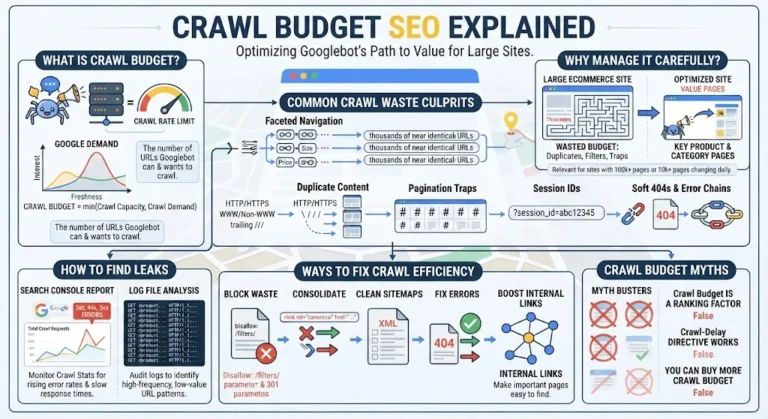
Not every site does, and it’s worth being honest about that. Google’s own guidance says crawl budget management is mainly relevant for very large sites (roughly a million or more unique pages with content changing about weekly), medium-to-large sites of around ten thousand or more pages that change daily, and sites with a large share of URLs sitting under “Discovered – currently not indexed” in Search Console.
If you’re outside those ranges and your new pages are getting indexed within a few days, your time is better spent on content and internal linking. If you’re inside them, or if launches keep taking weeks to appear, keep reading.
Crawl waste is any request Googlebot spends on a URL that will never rank or doesn’t deserve to. Most crawl budget SEO problems on large sites trace back to a short list of culprits:
The pattern is almost always the same. The site’s structure quietly generates far more URLs than anyone planned for, and Googlebot follows all of them.
You don’t need a guess when you can measure it. Start with two sources.
Search Console’s Crawl Stats report shows total requests per day, average response time, the split between response codes, and which file types Googlebot is fetching. Look for a rising share of 3xx, 4xx or 5xx responses, and a response time that’s climbing.
Log file analysis is the more honest view, and in crawl budget SEO work it’s where most audits should start. Server logs record every request Googlebot actually made, so you can see which directories and parameter patterns eat the most hits, which important pages barely get crawled, and how often. Filter for verified Googlebot only, since plenty of scrapers fake the user agent. Then compare the crawl distribution against your revenue pages. If 40% of requests hit filter URLs that you’d never want ranked, you’ve found your leak.
Cross-check with a site crawl to find orphan pages: URLs that appear in logs or sitemaps but that a crawler can’t reach through internal links.
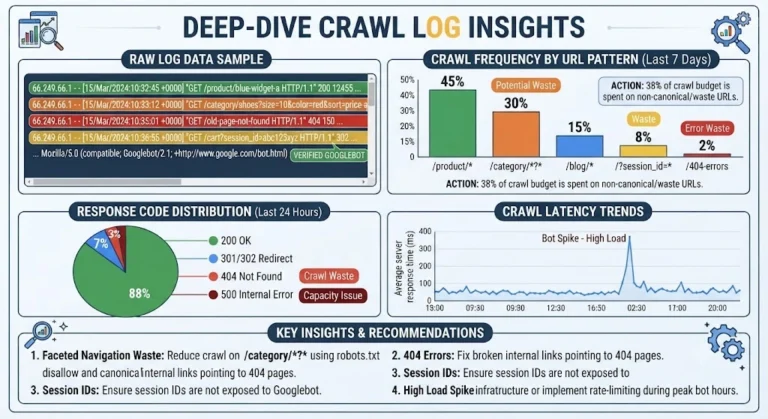
Once you know where the waste is, these are the fixes that matter most in crawl budget SEO, and they form the backbone of any crawl budget optimization plan for a large site.
Use robots.txt to disallow parameter patterns, internal search paths and infinite-space URLs. One detail people miss: a noindex tag does not save crawl budget, because Google still has to fetch the page to read the tag. Disallowing is what stops the fetch. Just don’t disallow anything you need Google to see in order to understand a canonical or noindex signal.
Use canonical tags, clean 301 redirects and consistent internal links so each page has one obvious address. Canonicals are a hint, not a command, and Google still crawls the duplicates to some extent, so fixing the source of the duplicate URLs is better than leaning on canonicals alone.
Include only indexable, canonical, 200-status URLs, and keep the lastmod date accurate. Updating lastmod on every page every day teaches Google to ignore it. Splitting sitemaps by section makes it much easier to see which parts of the site are being indexed.
Point internal links straight at the final URL. Return a proper 404 or 410 for pages that are gone rather than a soft 404, and clear out internal links that lead to them.
Good crawl budget SEO often comes down to links, because Googlebot discovers and prioritises pages largely through them. Important pages should be a few clicks from the homepage, linked from relevant hubs, and never orphaned. Every orphan page you reconnect, or deliberately remove, is one less loose end.
Better hosting, caching and a CDN raise the crawl capacity ceiling. Speed for crawlers and speed for users overlap heavily, which is why our guide on INP and Core Web Vitals is a useful companion read. The same performance work that improves user experience also helps Googlebot get through more URLs per visit.
A few ideas keep circulating that don’t hold up. The crawl-delay directive in robots.txt is ignored by Googlebot. Crawl budget is not a ranking factor: crawling more doesn’t rank you higher, it just means your pages are discovered and refreshed sooner. And you can’t “buy” more crawl budget. You earn it with a healthy server and content Google finds worth revisiting.
It’s the number of pages Googlebot is able and willing to crawl on your site within a certain time. It depends on how much your server can handle and how much Google wants to revisit your content.
Usually no. If your site has a few thousand pages or fewer and new content gets indexed quickly, crawl budget isn’t your bottleneck. Focus on content quality and internal links instead.
Open the Crawl Stats report in Google Search Console (under Settings). It shows daily crawl requests, response times and response code breakdowns. For a deeper view, analyse your server logs.
No. A higher crawl rate doesn’t lift rankings. It only affects how quickly pages are discovered and updated in the index.
The crawl rate limit is the ceiling set by your server’s capacity. Crawl demand is Google’s interest in your URLs. The lower of the two effectively sets your crawl budget.
Not really. Google has to crawl a page to see its noindex tag. To stop crawling, use robots.txt disallow rules, and only for URLs you don’t need Google to process at all.
It’s the review of your server’s raw request logs to see exactly what Googlebot fetched, how often and with what response. It’s the most accurate way to spot crawl waste and under-crawled pages.
Orphan pages have no internal links pointing to them, so Google finds them only through sitemaps or old links, if at all. They’re crawled inconsistently and pass no internal link value. Link the useful ones and remove the rest.
Yes, it’s one of the biggest causes of crawl waste on ecommerce sites. Filter combinations can produce huge numbers of near-duplicate URLs. Control them with robots.txt rules, canonicals and careful internal linking.
There’s no fixed timeline. Google’s crawl patterns shift over days to weeks. Track Crawl Stats, indexing coverage and how quickly new URLs appear, then compare with your starting point.
Crawl budget SEO isn’t about chasing a number. It’s about removing the friction between Googlebot and your best pages: fewer junk URLs, cleaner signals, faster responses and stronger internal links. Start with the Crawl Stats report, confirm the picture with log file analysis, fix the biggest leaks first, and re-measure after a few weeks.
If your site has thousands of pages and you suspect Googlebot is wasting its visits, we can look at your logs and Search Console data with you and point out where the waste is. Call 9718159724 and we’ll help you work out where to start.