Voice Search and Local SEO: What “Near Me” Queries Actually Need
Voice Search and Local SEO: What “Near Me” Queries Actually Need Voice search local SEO is about making your business...
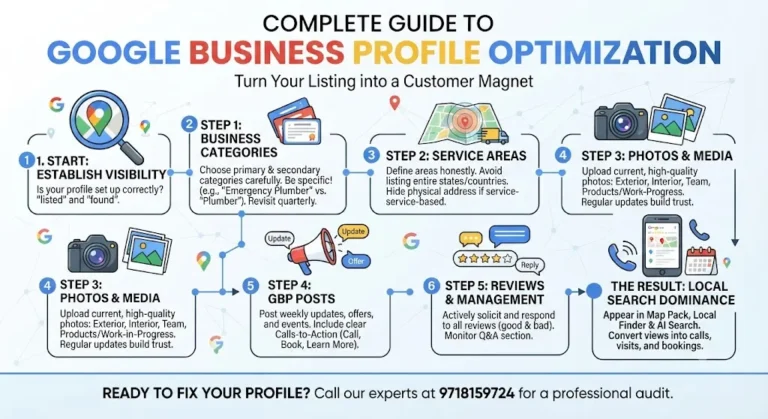
Read More → Google Business Profile optimization is what closes the gap between “we have a listing” and “we actually show up” — in the map pack, in local search, and in Google’s AI-driven results. If your profile isn’t set up correctly, you’re invisible to the exact customers searching for you right now.
Most business owners treat their profile like a one-time form they filled out and forgot. That’s the mistake. Google rewards profiles that stay active, accurate, and complete — and it quietly buries the ones that don’t.
Quick answer: Google Business Profile optimization means getting your categories, service areas, photos, posts, and reviews all working together so your listing ranks in the map pack and converts views into calls or visits — not a one-time setup, but ongoing management.
Search behavior has shifted. Someone typing “plumber near me” or “dentist open now” isn’t scrolling through ten blue links. They’re looking at three map pack results and deciding in seconds. If your profile isn’t optimized, you don’t lose the click — you never even get seen.
A properly optimized Google Business Profile does three things a bare listing can’t:
That last point is exactly why Google Business Profile optimization has become its own specialty, rather than a checkbox item inside broader marketing.
Category selection is the single most underrated ranking factor on the entire profile. Google uses your primary category to decide which searches you’re even eligible to appear in. Get it wrong, and no amount of reviews or posts will fix the mismatch.
Google maintains its own list of official business categories — checking it directly, rather than guessing, is the fastest way to catch a more precise option.
A few rules that actually move the needle:
For businesses that travel to customers rather than operate from a storefront, service area setup is where most Google Business Profile optimization work goes wrong.
Common mistakes to avoid:
Set service areas to match where you actually, reliably do business. If you serve five specific neighborhoods well, list those five — not the whole metro area you occasionally reach.
Profiles with a healthy, current photo library get meaningfully more engagement than bare-bones listings. Not because Google explicitly rewards photo count, but because searchers spend longer on the profile and are more likely to click through, call, or request directions when they can actually see what they’re walking into.
What to prioritize:
Upload new photos regularly rather than dumping twenty at once and going quiet for a year. A profile that visibly updates looks like a business that’s actually open and active.
Suggested image alt text if you add photos to this page: “Google Business Profile optimization example — storefront photo,” “GBP category selection screenshot,” “local map pack ranking example.”
GBP posts are the closest thing to free advertising real estate directly inside the search result. Most businesses either ignore this feature entirely or post once and abandon it — both are missed opportunities.
A working posting rhythm looks like:
If you don’t yet have a fixed posting calendar or dedicated content in place, that’s worth building out as part of an ongoing optimization plan. A real cadence here compounds over months, not days.
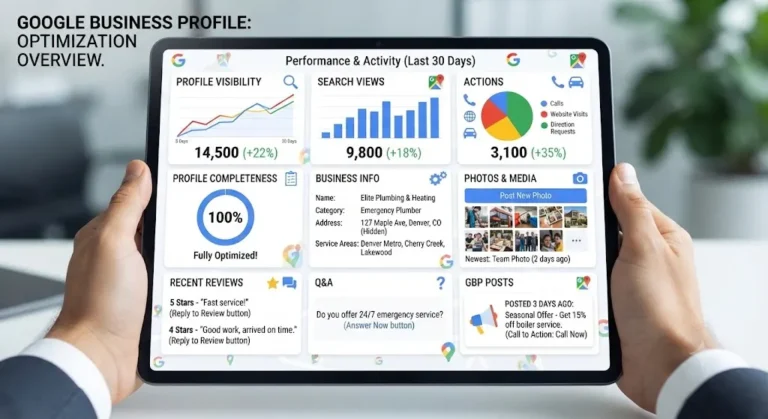
Categories, service areas, and photos get the initial setup right — but a Google Business Profile is never really “done.” Questions accumulate in the Q&A section, new reviews need timely responses, and business details change over time.
Treating the profile as a living asset, rather than a static form, is what separates listings that rank and stay ranked from ones that slowly fade.
Google Business Profile optimization doesn’t work in isolation. It’s one piece of a larger local SEO strategy that also covers on-site local signals, citations, and structured local content.
A fully optimized GBP feeds into that larger strategy rather than replacing it — the profile gets you found, and the rest of the local SEO work keeps you found consistently.
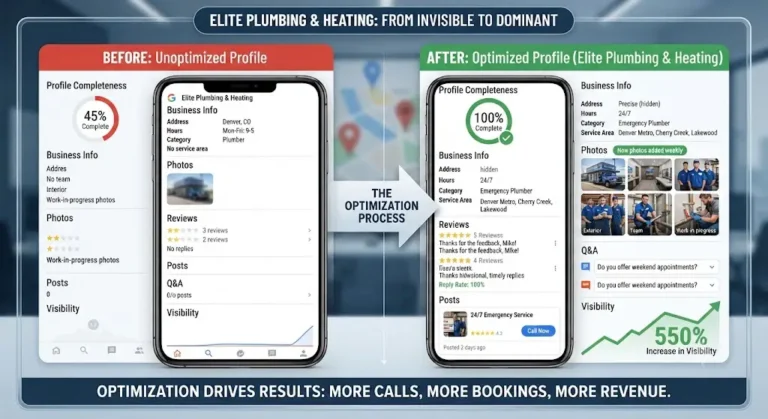
Most businesses start noticing changes in visibility within a few weeks. Meaningful ranking improvement in competitive categories typically takes a couple of months of consistent activity — reviews, posts, and accurate information all compounding together.
You can absolutely do the basics yourself — category selection, photo uploads, and responding to reviews don’t require special tools. A dedicated service adds value in ongoing management, competitive category research, and the consistent posting cadence most owners don’t have time to sustain.
Review count and recency both play a role, but review quality and how well you respond matter just as much. A business with fewer, well-managed reviews often outperforms one with many reviews left unanswered.
Use one strong, specific primary category, then add secondary categories for genuine additional services you offer. Too many unrelated categories can dilute relevance rather than expand it.
Google may deprioritize you for all of it rather than ranking you well in your actual core area. A tighter, honest service area typically outperforms an inflated one.
Weekly is a reasonable baseline for most local businesses. What matters more than exact frequency is consistency — a steady rhythm signals an actively managed business far better than sporadic bursts followed by long silence.
No. Service-area businesses without a public storefront can and should set up a profile, with the address hidden and service areas defined instead of a physical location listing.
Yes. Incorrect hours, an old phone number, or a stale address don’t just frustrate customers — they signal to Google that the profile isn’t actively maintained, which can affect trust and visibility over time.
Google Business Profile optimization focuses specifically on the listing itself — categories, posts, photos, reviews. Local SEO is the broader umbrella that also includes your website’s local signals, citations across other directories, and location-specific content.
Compare your visibility for core search terms against direct competitors in the map pack, check how complete your profile is against the categories and photos covered above, and look at how recently you’ve posted or updated information.
A Google Business Profile that isn’t actively optimized is losing you customers to competitors who show up first — even ones offering less. Categories, service areas, photos, posts, and reviews all need to work together, and that only happens with someone actively managing the profile month after month, not a one-time setup and walk-away.
Call 9718159724 and we’ll walk through where your profile currently stands and what’s realistically holding it back.