Voice Search and Local SEO: What “Near Me” Queries Actually Need
Voice Search and Local SEO: What “Near Me” Queries Actually Need Voice search local SEO is about making your business...
Read More → If Google can’t crawl a page, it can’t rank it — and if it can crawl but won’t index it, the page still won’t show up in search. Both problems usually trace back to the same handful of culprits: a misconfigured robots.txt, a broken or outdated sitemap, accidental noindex tags, or canonical tags pointing search engines to the wrong URL. Fixing them is mostly a matter of finding exactly where the block is happening, then correcting it — which is precisely what a proper seo audit service does before touching anything else on a site.
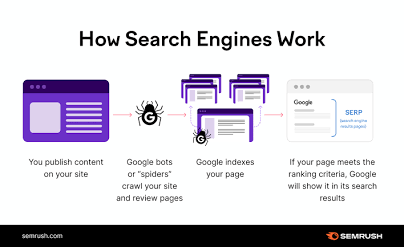
Crawlability and indexability are two different gates, and a page has to pass both to appear in search results.
Crawlability is about access — can Googlebot even reach the page? A disallow rule in robots.txt, a broken internal link structure, or a server returning errors on request can all stop a crawler cold before it ever sees the content.
Indexability is about eligibility — once Googlebot has crawled a page, does it decide the page deserves a spot in the index? A noindex tag, a canonical pointing elsewhere, thin or duplicate content, or a page Google judges low-value can all get a page crawled but never indexed.
Most sites lose visibility through a mix of both, which is why fixing one without checking the other rarely solves the real problem.

Robots.txt sits at the root of a domain and tells crawlers which paths they’re allowed to request. It’s a small file that causes outsized damage when it’s wrong.
Common mistakes worth checking right now:
Google Search Console‘s robots.txt tester will flag exactly which rule is blocking a given URL, which is faster than reading the raw file line by line and guessing.
A sitemap doesn’t force Google to index anything, but it does tell Google what exists and where to look first — and a broken one wastes that signal entirely.
Watch for:
A sitemap should be a live, accurate list — not a static file generated once at launch and forgotten.
A noindex tag is meant to be a deliberate choice, but it’s one of the easiest things to leave in place by accident. The usual scenario: a developer sets pages to noindex during a staging or migration phase, and the tag never gets removed when the site goes live.
To catch this, check:
Search Console’s URL Inspection tool will show exactly how Google is reading the page’s indexing status, including which signal is causing the exclusion.
Canonical tags exist to solve duplicate content, but a wrong one can quietly redirect all of a page’s ranking signal to the wrong URL — and the page you actually wanted to rank never gets a chance.
Frequent canonical mistakes:
Search Console’s Pages report (formerly Coverage) groups issues into categories, and each one points to a different fix:
Cross-referencing these categories against the actual pages affected — rather than treating the report as one big pile of errors — is what separates a quick fix from weeks of guessing.
Crawl budget is the rough allowance of pages Googlebot will crawl on a given site within a given timeframe. On a small site this rarely matters. On a site with thousands of URLs — especially ones with filtered navigation, faceted search, or auto-generated pages — it becomes a real constraint.
Wasted crawl budget usually comes from:
Trimming these down means Googlebot spends its limited crawl allowance on pages that are actually worth indexing.
Each step depends on the one before it — there’s little point auditing canonicals on a page robots.txt is already blocking. This is exactly the order a proper technical seo audit service works through, because fixing things out of sequence tends to mask problems rather than solve them.
If you’d rather have someone go through this systematically on your site instead of chasing each issue separately, you can reach out at 9718159724 to get a technical SEO audit scoped to your site’s actual crawl and index data — not a generic checklist. For the fuller picture of what’s included, see our Technical SEO Audit Services page.
Check the Pages report in Search Console — it lists indexed pages separately from excluded ones, along with the specific reason each excluded page was left out.
Yes. Crawling and indexing are separate steps. Google can crawl a page fully and still choose not to index it if the content is thin, duplicated, or judged low-value.
No — robots.txt only stops crawling, not indexing. A page already indexed before being blocked can stay in the index with limited information, since Google can no longer recrawl it to update or remove it.
Disallow in robots.txt prevents crawling entirely. Noindex allows crawling but tells Google not to include the page in search results. Using both together on the same page is actually counterproductive, since Google needs to crawl a page to see the noindex tag.
It should update automatically whenever pages are added, removed, or significantly changed — most CMS platforms can regenerate it dynamically rather than relying on a manually maintained file.
This typically means Google found the URL but hasn’t crawled it yet, often due to crawl budget constraints or the page being deep in the site’s link structure with few internal links pointing to it.
Yes. Google may choose not to index a page it considers a near-duplicate of another, selecting one version as canonical and leaving the rest out of the index even without any tag telling it to.
They slow it down. Each extra hop in a redirect chain consumes crawl budget and can cause Google to stop following the chain before reaching the final page, especially on larger sites.
It varies — some pages get recrawled and reindexed within days, others take weeks depending on the site’s overall crawl frequency and the page’s perceived importance in the site’s link structure.
Crawlability and indexing problems tend to resurface after site migrations, CMS updates, or plugin changes, so periodic checks — not just a one-time audit — keep issues from silently creeping back in.
Crawlability and indexing problems rarely announce themselves — a page just quietly stops showing up, and nothing about the site looks broken on the surface. That’s exactly why these issues linger for months on sites that otherwise look fine: the fix isn’t visible from the front end, only from robots.txt, the sitemap, the meta tags, and Search Console’s reports. Working through them in order — access first, then eligibility, then crawl efficiency — is what turns a vague “why aren’t we ranking” problem into a specific, fixable list. If that list feels overwhelming to sort through on your own, call 9718159724 and get it mapped out properly instead of guessing page by page.