Voice Search and Local SEO: What “Near Me” Queries Actually Need
Voice Search and Local SEO: What “Near Me” Queries Actually Need Voice search local SEO is about making your business...
Read More → Multi location SEO cannibalization happens when two or more of your city pages compete for the same search query, so Google can’t decide which one deserves to rank. The fix is to give every city page its own search intent, its own local content, and a clear place in your site structure. If you run a franchise or a business with several branches, handling multi location SEO cannibalization early keeps your pages from swapping positions or never ranking at all.
Say you have pages for Delhi, Noida and Gurgaon, and all three target “best dentist near me” with the same service text and only the city name changed. Google sees three near-identical answers. It may rank one at random, rotate them week to week, or filter the extras out as duplicates.
Multi location SEO cannibalization isn’t a penalty. Your own pages are splitting clicks, backlinks and relevance that one strong page could have held on its own.
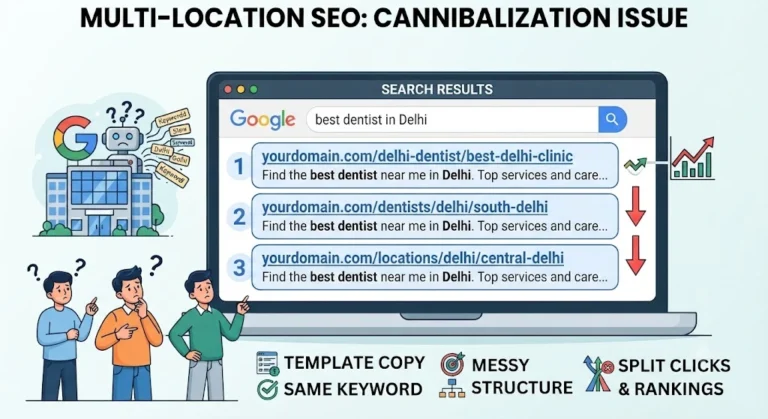
Most of the time the cause is how the pages were built, not any one mistake. These are the usual culprits:
Open Google Search Console, go to Performance, and filter by a query like “[service] in [city]”. Then open the Pages tab. If two or more URLs from your site show up for that query, you probably have multi location SEO cannibalization. Other signs are rankings that jump between URLs, a branch page that never gets impressions for its own city, or a generic page outranking your local one.
A quick manual check also works. Search for your service plus the city and see which of your URLs appears. If it’s the wrong branch, the signals on your pages are crossed.
Location page differentiation starts with a simple rule: one URL, one primary keyword, one city. Build a sheet with the page URL, the main query it should rank for, and the city or area it serves. If two rows end up with the same main query, one of those pages shouldn’t exist as a separate page.
Search intent differs between cities too. A user in a metro city may search by neighbourhood, while someone in a smaller town searches by the town name. Let those patterns decide which pages you build.
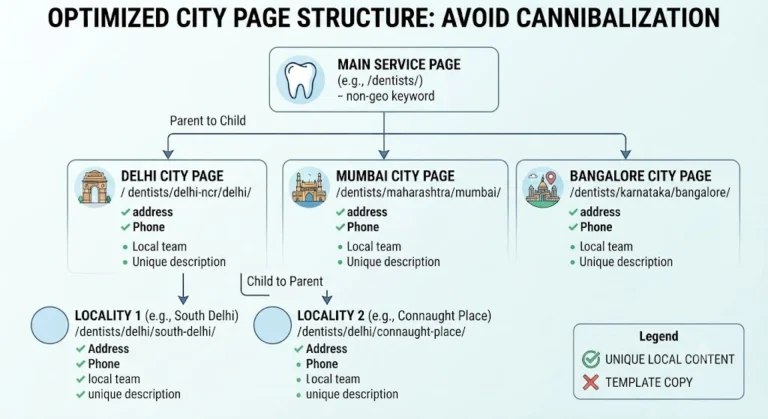
A good franchise SEO structure tells Google how your pages relate, which reduces multi location SEO cannibalization at the architecture level. A common layout looks like this:
Keep your URLs clean and predictable, like /services/city-name/. Add breadcrumbs so the hierarchy is visible to users and crawlers. The broad page should never compete with a city page, because it targets a different level of query.
Unique local content is what really separates one city page from another. Changing the city name doesn’t count. Add details that are true only for that location:
If you can’t write at least a few genuinely different paragraphs for a city, that’s a signal the page may not deserve to stand alone.
Each geo-targeted page needs its own title tag, meta description and H1. Lead with the service and city, then add something specific to the branch, such as the area name or a service highlight. Don’t copy one title pattern with only the city changed.
For internal links, point each city page up to its parent service page, and link down from the hub to every city page. Avoid long chains of city pages linking to each other with the same anchor text. Vary anchors naturally, like “our Noida branch” or “dental care in Sector 62”, instead of repeating one exact phrase.
Some pages can’t be saved. If two cities share one customer base and you have nothing distinct to say about each, merge them into one service-area page and 301 redirect the weaker URL to the stronger one. Be careful with canonical tags. If you point one city page’s canonical to another, you’re telling Google to ignore it, so only do that when you truly want that page out of the results.
Fixing multi location SEO cannibalization often means publishing fewer pages, not more. One strong city page beats three thin ones.
It is when several of your location pages target the same keyword or intent, so they compete against each other in search results instead of supporting each other.
No. Google doesn’t penalize it, but your rankings, clicks and link value get split across pages, which usually means none of them performs as well as it could.
There’s no fixed number. The test is whether each page can carry unique, useful content and serve a real search demand. If it can’t, it’s too many.
They’re related but different. Duplicate content means the text is the same or nearly the same. Cannibalization means pages compete for the same query, and duplicate text is one common cause.
Only if you want one page to replace another in search. If both cities need to rank on their own, each page should be self-canonical and have unique content.
A short shared description is fine as long as the page has substantial local content around it. The majority of each page should be specific to that location.
Use Google Search Console. Filter by the query, then view the Pages tab to see every URL getting impressions for it.
A simple hierarchy of main service page, city pages, and branch pages only where there’s real local demand. Keep URLs predictable and link them logically.
Only if people search for those neighbourhoods separately and you can offer distinct information for each. Otherwise cover them on the main city page.
It depends on how often Google recrawls your pages and how many were affected. Changes often show gradually over weeks to a few months, so track queries in Search Console after you make them.
Multi location SEO cannibalization is rarely about one big error. It builds up through cloned copy, overlapping keywords and an unclear site structure. Give every city page one intent, write unique local content, keep a clean franchise SEO structure, and merge pages that can’t justify their own place. Do that and your location pages will support each other instead of competing.
Need help auditing your city pages or fixing multi location SEO cannibalization on your site? Call us at 9718159724.