Voice Search and Local SEO: What “Near Me” Queries Actually Need
Voice Search and Local SEO: What “Near Me” Queries Actually Need Voice search local SEO is about making your business...
Read More → The short version of title tag meta description best practices 2026 is this: write the title tag to match what the searcher typed, keep it around 50–60 characters (roughly 600 pixels), and treat the meta description as a 120–155 character pitch that gives people a reason to click. Everything below builds on that, with examples, pixel-width rules, and a simple testing routine you can run in Search Console.
The title tag is the HTML element that names your page. It appears as the blue headline in search results and as the text on the browser tab. The meta description is a short summary placed in the page’s head section, and it often becomes the snippet under the headline.
They do different jobs. The title tag helps search engines understand what the page is about, and it is the first thing a person reads. Google has said the meta description isn’t a direct ranking factor, but it shapes whether someone clicks, and clicks are the reason you’re optimizing a listing in the first place.
Both are suggestions rather than commands. Google can rewrite either one, which we’ll get to further down.
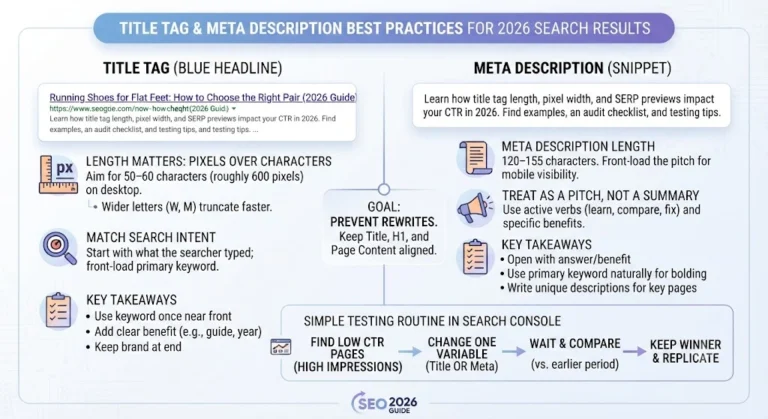
Google cuts off titles based on pixel width, not a fixed character count. On desktop the cutoff sits around 600 pixels, which usually works out to 50–60 characters. Google doesn’t publish an exact limit, so treat these numbers as working guidelines.
Letter shapes change the math. A title full of wide letters like W, M and capital letters runs out of space sooner than one packed with narrow letters like i, l and t. That’s why two titles with the same character count can truncate differently.
A few practical rules follow:
Google cuts off titles based on pixel width, not a fixed character count. On desktop the cutoff sits around 600 pixels, which usually works out to 50–60 characters. Google doesn’t publish an exact limit, so treat these numbers as working guidelines.
Letter shapes change the math. A title full of wide letters like W, M and capital letters runs out of space sooner than one packed with narrow letters like i, l and t. That’s why two titles with the same character count can truncate differently.
A few practical rules follow:
Start with the search query, not with your brand. Ask what the person typed and what they expect to find, then say it plainly.
Weak: Shoes | Buy Shoes | Cheap Shoes Online | Best Shoe Store
Stronger: Running Shoes for Flat Feet: How to Choose the Right Pair
The first version repeats the same word and promises nothing. The second names the topic, the audience, and the outcome.
Some rules that hold up well:
Matching the title to what the searcher wants is half the battle. We go deeper on that in Blog 4 of this series, which covers search intent, so read it alongside this one when you rework titles for informational, commercial and transactional queries.
For meta descriptions, a workable target is 120–155 characters. Desktop snippets can stretch to roughly 920 pixels, while mobile snippets are shorter, so put the important part first. If the ending gets cut off on a phone, the reader should still have the whole point.
Good snippet optimization comes down to a few habits:
Weak: Welcome to our website. We offer the best SEO tips and services for everyone.
Stronger: Learn how title tag length and pixel width affect your search listing, with examples you can copy and a quick checklist to audit your own pages.
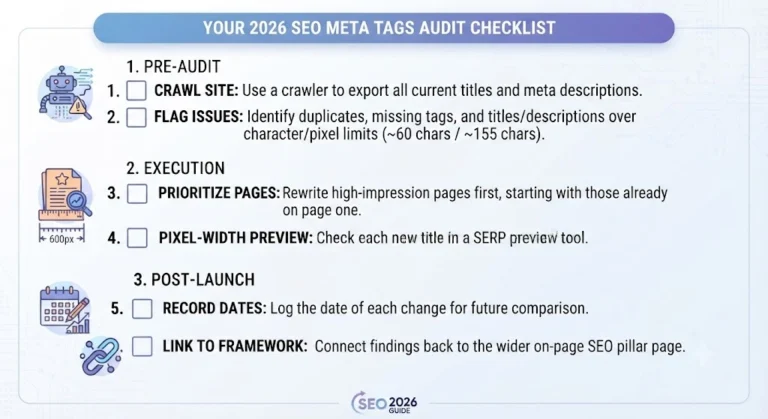
Meta description CTR improves when the snippet promises something specific that the page delivers. No one can promise a fixed lift from a rewrite, so test it on your own data.
A simple routine:
Impressions and position matter here. A page sitting at position 9 will always get fewer clicks than one at position 2, so compare like with like.
You’ll sometimes see a headline or description in the results that you never wrote. This usually happens when:
The fix is alignment. Make the title tag, the H1 and the opening of the page tell the same story, and write a description that answers the likely query. You can’t fully prevent rewrites, but a clear, honest listing gets replaced far less often.
As AI-generated summaries take up more room on results pages, your listing has to give a reason to click that the summary doesn’t. Specific titles do that: a named audience, a concrete outcome, a format like “checklist” or “step-by-step.” Vague titles like “Everything You Need to Know” get skipped.
Clear headings and direct answers near the top of your page also help search engines and answer engines pull the right part of your content. A well-written listing and a well-structured page work together.
Follow this order when you review a site for title tag and meta description best practices for 2026:
Aim for about 50–60 characters, which usually fits within roughly 600 pixels on desktop. Because Google truncates by pixel width, check a SERP preview instead of relying only on a character counter.
Between 120 and 155 characters works well for most pages. Put the main point in the first sentence, since mobile snippets are shorter than desktop ones.
Google has said it isn’t a direct ranking factor. It still matters because a strong description can raise your click-through rate.
Yes, once in each, in natural wording. In the title, place it near the front. In the description, it helps because matching query words are often bolded in the snippet.
It usually happens when the title is too long, keyword-stuffed, generic, or different from the page’s H1. Making the title and H1 agree reduces rewrites.
You can’t fully control it, but a description that matches the searcher’s query and accurately summarizes the page is used more often. Missing, very short or duplicated descriptions are more likely to be replaced.
Yes for pages that matter for search. Duplicate titles confuse relevance signals, and identical descriptions waste the chance to earn clicks.
Only when the content is genuinely updated for that year and the searcher would expect it, such as a guide meant to be current. If you add a year, update it when you refresh the content.
Use Search Console to compare the click-through rate of the same page before and after the change, for a similar length of time. Change only one element at a time.
The principles are the same, but mobile snippets show fewer characters and titles can wrap differently. Put the key words early and preview both versions.
Strong listings come from a small number of habits: write titles around the searcher’s query, respect pixel width instead of only character counts, give each meta description a specific promise, and test changes in Search Console instead of guessing. Follow the title tag meta description best practices 2026 covered above, audit your highest-impression pages first, and keep the title, H1 and page content aligned so Google has little reason to rewrite them.
If you’d like help auditing or rewriting your titles and descriptions, call 9718159724.