Voice Search and Local SEO: What “Near Me” Queries Actually Need
Voice Search and Local SEO: What “Near Me” Queries Actually Need Voice search local SEO is about making your business...
Read More → A slow WordPress site quietly kills rankings before a single backlink or keyword strategy even comes into play. Google measures how fast your pages load, and readers decide within seconds whether to stay or bounce. If you’re searching for a reliable wordpress seo optimization service, the real work usually starts here — fixing speed, not just sprinkling keywords.
Search engines crawl and rank based on real user experience signals — how fast content becomes visible, how quickly a page responds to a click or tap, and how stable the layout stays while loading. A bloated, slow-loading WordPress site sends the opposite signal: visitors leave, engagement drops, and crawlers spend less time indexing your pages properly.
This is exactly why wordpress speed optimization for seo isn’t a side task — it’s foundational. You can write the best content on the internet, but if the page takes six seconds to become interactive, most people never read past the first line.
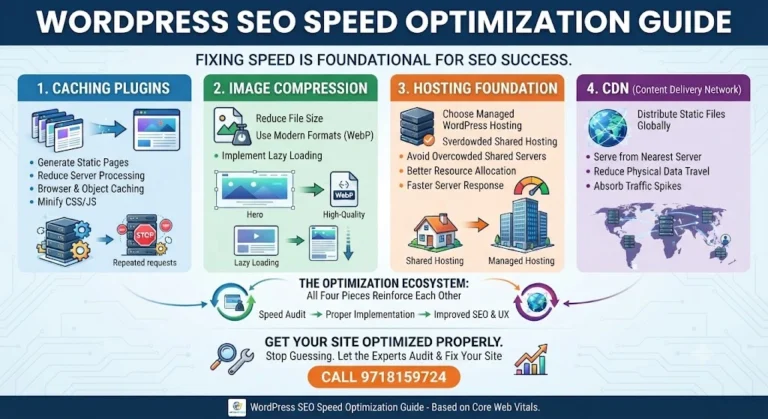
WordPress is dynamic by nature — it pulls data from your database, runs PHP, and assembles the page every single time someone visits. That’s expensive, especially under traffic spikes. Caching plugins generate a static version of your pages once and serve that static copy to future visitors, cutting server processing time dramatically.
Good caching setups also handle:
The mistake most site owners make here isn’t skipping caching — it’s installing a plugin and never configuring it properly, which leaves half the performance gains on the table.
Unoptimized images are, more often than not, the heaviest files on a WordPress page. A single uncompressed hero banner can weigh more than an entire optimized page combined. Compression tools reduce file size while keeping visual quality intact, and modern formats like WebP shrink images further without the visible loss older formats like JPEG suffer at similar compression levels.
Page speed wordpress improvements almost always show their fastest, most visible jump right after image optimization — it’s usually the first thing worth auditing on any slow site.
Beyond compression, lazy loading (only loading images as the visitor scrolls to them) prevents the browser from downloading content that isn’t even in view yet.
No amount of plugin tuning fixes a server that’s fundamentally underpowered or overcrowded. Shared hosting environments, where hundreds of sites compete for the same limited resources, are a common bottleneck that no amount of caching can fully mask. Managed WordPress hosting, built specifically around WordPress’s architecture, tends to handle server-level caching, PHP versions, and resource allocation far more efficiently than generic shared plans.
If your site has plateaued in speed no matter what you optimize on the plugin side, the hosting tier itself is worth reviewing before anything else.
A Content Delivery Network stores copies of your site’s static files — images, CSS, JavaScript — across servers positioned around the world. Instead of every visitor pulling data from one origin server, they get served from whichever server is geographically nearest to them. For sites with visitors spread across regions, this alone can meaningfully cut load times, since data simply has less physical distance to travel.
CDNs also absorb traffic spikes better than a single origin server would, adding a layer of stability during high-traffic periods.
None of these fixes work in isolation. A CDN without image compression still serves oversized files, just faster. Caching without decent hosting still bottlenecks under load. The pieces reinforce each other — which is also why a proper WordPress SEO optimization service audits all four together instead of tackling one and calling it done.
This kind of technical groundwork sits within our broader WordPress SEO Services, which cover the full picture beyond just speed — and connects directly with our Technical SEO work, since crawlability and indexing issues are frequently tangled up with the same underlying performance problems.
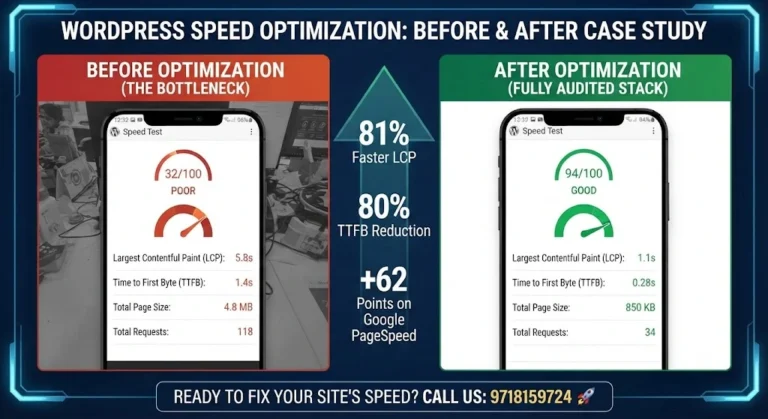
Each of these looks like progress on paper but delivers little real-world speed improvement, which is why measuring actual load times before and after each change matters more than assuming a fix worked.
It’s one of several signals search engines use to judge user experience, alongside content relevance and backlinks. A slow site won’t tank rankings on its own, but it puts you at a disadvantage against faster competitors targeting the same keywords.
They solve different problems. Caching reduces server processing time; a CDN reduces the physical distance data travels. The best results come from using both together, not choosing one over the other.
Yes. A CDN delivers files faster, but it doesn’t shrink them. An uncompressed 5MB image delivered quickly is still a 5MB image the browser has to download and render.
Not always, but it’s limiting once traffic grows. Shared hosting works fine for small, low-traffic sites, but as visitor numbers rise, resource competition with other sites on the same server starts showing up as slower load times.
If speed test tools show high “server response time” or “Time to First Byte” even after caching and image optimization are in place, the hosting environment itself is usually the limiting factor.
WebP typically achieves smaller file sizes than JPEG at comparable visual quality, which translates to faster load times. Browser support for WebP is now broad, making it a practical default for most sites.
Yes. Every active plugin adds some processing overhead, and poorly coded plugins can slow a site significantly even with caching in place. Periodically auditing and removing unused plugins is part of proper speed maintenance.
It matters more, if anything. Mobile connections are often slower and less stable than desktop connections, and search engines evaluate mobile performance as a primary signal given how much browsing happens on phones.
Whenever you add new plugins, themes, or significant content, or at minimum every few months, since accumulated changes gradually add weight back to a site even after an initial optimization pass.
Speed is foundational, but it’s one piece of a larger technical SEO picture that includes crawlability, site structure, and content quality. Treat speed as the base layer everything else builds on, not the entire strategy.
Guessing at which plugin to install or which hosting plan to upgrade to often wastes time and money without moving the needle. A proper audit looks at caching, images, hosting, and CDN configuration together, then fixes what’s actually slowing your specific site down.
If you want your WordPress site’s speed and SEO handled by people who’ll actually walk you through what’s wrong and what’s fixed, call 9718159724 to get started.