Shopify SEO Checklist for 2026: What Actually Moves Rankings
If you run a Shopify store and your organic traffic has been flat for months, the checklist you followed in 2023 probably isn’t the reason. Google’s shown a strong preference for stores with clean product schema, fast collection pages, and content that answers real buyer questions — not just stores with more blog posts. That’s also why so many brands end up searching for the best Shopify SEO services company in Delhi rather than trying to patch things together internally: the technical side of Shopify SEO has gotten more demanding, and small mistakes on product or collection pages quietly cap your rankings before content even gets a chance to work.
This checklist walks through what’s worth fixing first, why each piece matters for Shopify specifically (not WooCommerce, not a generic CMS), and where most stores lose visibility without realizing it.
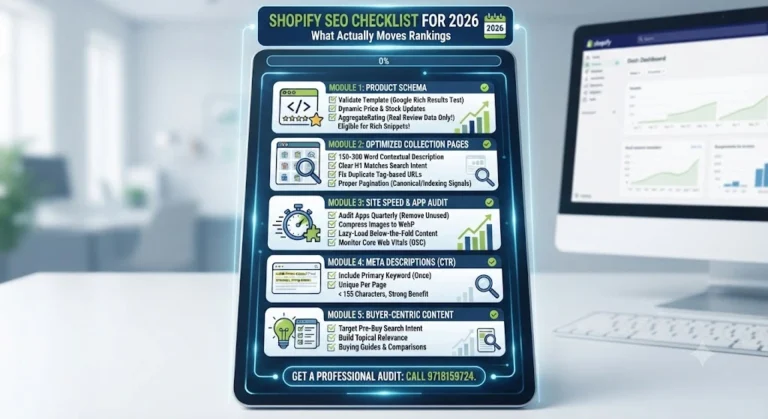
Why Shopify SEO Isn't the Same as Generic Ecommerce SEO
Shopify handles a lot of SEO basics automatically — sitemap generation, basic canonical tags, mobile responsiveness on most themes. That’s the trap. Store owners assume the platform is “doing SEO for them,” when in reality Shopify only handles the floor, not the ceiling. Collection page duplication, thin product descriptions, app bloat slowing down page speed, and missing schema markup are all things Shopify won’t fix on its own — and they’re exactly what separates a store ranking on page one from one stuck on page three.
1. Product Schema: The Most Skipped Step
Product schema (structured data) tells Google exactly what you’re selling — price, availability, reviews, variants — so it can show rich results like star ratings and price ranges directly in search. Most Shopify themes ship with partial or outdated schema, and a lot of apps that promise to “auto-add schema” end up duplicating it, which causes more harm than having none at all.
What to actually check:
- Validate every product template with Google’s Rich Results Test, not just the homepage
- Make sure price and availability update dynamically with inventory — stale schema showing “in stock” for a sold-out product hurts trust signals
- Add Product, Offer, and AggregateRating schema only where you have real review data — never populate ratings you don’t actually have
Get this right and your product pages become eligible for rich snippets, which pull a noticeably higher click-through rate than a plain blue link.
2. Collection Pages Are Doing More SEO Work Than You Think
Product pages get all the attention, but collection pages (category pages) are usually what ranks for your highest-volume, most valuable keywords — things like “men’s running shoes” or “organic skincare gift sets.” Most Shopify stores treat collection pages as a filter mechanism and forget they’re also a page Google needs to understand.
Fix these on every major collection:
- Write a genuine 150–300 word description above or below the product grid — not keyword-stuffed filler, actual context on what the collection covers and who it’s for
- Set a clear H1 that matches search intent (not just the collection’s internal name, like “Summer24-Drop2”)
- Avoid duplicate collection pages created by tag-based filtering unless canonical tags are set correctly
- Paginate properly — infinite scroll without proper indexing signals can hide products from Google entirely
3. Site Speed on Shopify Is Mostly an App Problem
Shopify’s core infrastructure is fast. What slows stores down is almost always the app stack — review widgets, upsell popups, tracking pixels, and heavy image carousels all loading on every page whether they’re needed there or not.
Practical steps that make a real difference:
- Audit installed apps quarterly and remove anything not actively driving conversions
- Compress and serve images in WebP format — Shopify supports this natively through most modern themes
- Lazy-load below-the-fold images, especially on collection pages with 40+ products
- Check Core Web Vitals in Google Search Console monthly, not just once during a redesign
A one-second delay in load time compounds across thousands of sessions — it shows up as lower rankings and lower conversion rates at the same time, which is why site speed sits high on any real ecommerce SEO checklist.
4. Meta Descriptions: Small Field, Real Impact on CTR
Meta descriptions don’t directly move rankings, but they influence whether someone clicks your result over a competitor’s — and click-through rate is a signal Google does factor into how a page performs over time. Shopify auto-generates a meta description from page content if you leave it blank, and it’s almost always generic and forgettable.
Write meta descriptions that:
- Include the primary keyword naturally, once
- State a specific benefit or differentiator (price, delivery speed, material, guarantee — only if genuinely true)
- Stay under 155 characters so they don’t get cut off in search results
- Are unique per page — duplicate meta descriptions across product variants is one of the most common Shopify SEO mistakes
5. Content Still Needs to Answer Something Real
Blog content on a Shopify store isn’t there to satisfy a content calendar — it’s there to capture the searches that happen before someone is ready to buy, and to build the topical relevance that helps your product and collection pages rank too. A well-structured Shopify SEO optimization service will usually build content around buying guides, comparison posts, and troubleshooting content, since those map directly to how customers actually search before purchasing.
Where Most Stores Lose the Most Ground
In practice, the biggest ranking losses on Shopify stores come from three repeatable mistakes: duplicate content from collection filtering, schema that’s either missing or incorrectly populated, and app bloat nobody’s audited in over a year. Fixing all three usually takes a proper technical audit rather than a one-off tweak — which is where working with a dedicated E-commerce SEO Services partner tends to pay off, since these issues cut across technical SEO, content, and store structure at the same time rather than sitting in one neat box.
A Realistic Process, Not a Quick Fix
If you’re evaluating whether to handle this in-house or bring in outside help, here’s roughly how a proper Shopify SEO engagement should run:
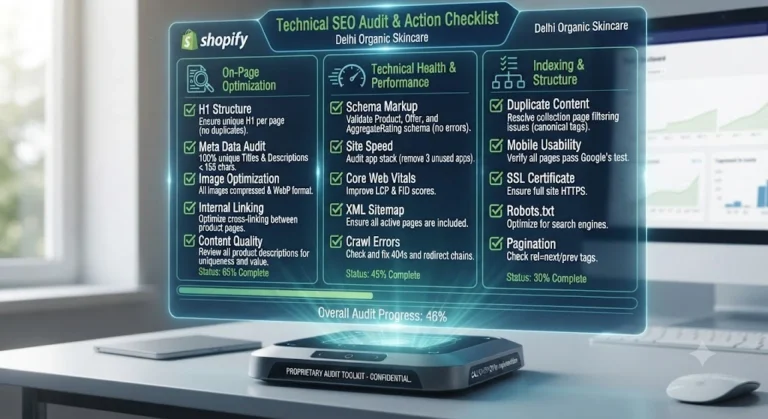
- Technical audit — crawl the full store, flag duplicate collections, broken schema, indexing issues, and speed bottlenecks
- Keyword mapping — assign target keywords to actual pages instead of stuffing everything onto the homepage
- On-page fixes — schema, meta descriptions, headings, internal linking corrected page by page
- Content plan — built around real search intent, not a generic 10-post calendar
- Monitoring — monthly tracking of rankings, Core Web Vitals, and organic conversion, with adjustments based on what Search Console actually shows
If a trust signal like verified client results or a specific track record matters to you when picking a partner, ask to see real Search Console data from past work — that’s a more honest indicator than a testimonials page.
Fequently asked questions
How long does Shopify SEO take to show results?
Technical fixes like schema and site speed can reflect in Search Console within a few weeks. Ranking movement for competitive keywords typically takes 3–6 months, since Google needs to recrawl and re-evaluate the page’s relevance over time.
Does Shopify have built-in SEO tools, or do I need an app?
Shopify includes basic SEO fields (title, meta description, alt text) natively. Apps become useful for schema automation, redirect management, and speed optimization, but they should supplement good manual setup, not replace it.
Why do my collection pages keep showing as duplicate content?
This usually happens when tag-based or filtered URLs (like ?color=red) get indexed as separate pages. Setting canonical tags correctly, or blocking filtered URLs from indexing, resolves most of this.
Is product schema really worth the effort for a small store?
Yes — schema is one of the few technical changes that can directly improve click-through rate through rich snippets, regardless of store size. It doesn’t require you to already have significant traffic to benefit.
Should I write unique descriptions for every single product?
For your top-selling and highest-margin products, yes. For low-priority SKUs, a well-written collection description and solid category structure often matters more than individually optimizing every product.
How many apps is too many for site speed?
There’s no fixed number — the issue is unused scripts loading on every page. A store with 15 well-audited apps can outperform one with 5 poorly configured ones. Quarterly app audits matter more than a hard cap.
Can I do Shopify SEO myself, or do I need an agency?
Basic on-page work (titles, meta descriptions, alt text) is manageable in-house. Technical audits, schema troubleshooting, and ongoing content strategy are where most store owners benefit from a dedicated Shopify SEO optimization service, mainly to save time rather than because it’s impossible to learn.
Does blog content actually help product pages rank?
Indirectly, yes. Relevant blog content builds topical authority and internal linking pathways that help Google understand how your product pages relate to broader search intent, which supports rankings even on pages you never directly write blog posts about.
What's the biggest mistake Delhi-based Shopify sellers make with SEO?
Treating SEO as a one-time setup task instead of an ongoing process. Many stores optimize once at launch and never revisit schema, page speed, or content as the catalog and competition change.
How do I know if my current SEO setup is actually working?
Check Google Search Console for impressions and click-through rate trends over the last 3 months, not just rankings. Flat impressions usually point to a technical or indexing issue; low click-through despite good impressions usually points to weak titles and meta descriptions.
Conclusion
Shopify SEO in 2026 rewards stores that get the fundamentals genuinely right — clean product schema, collection pages that are actually written for humans, fast load times, and content built around real buyer questions — rather than stores chasing shortcuts or generic checklists. If you’d rather have this audited and fixed properly than piece it together on your own, call 9718159724 and get a clear, honest read on where your store’s SEO stands today.