How Core Web Vitals Affect Your Google Rankings in 2026
If your pages load slow, jump around while loading, or feel sluggish to tap, Google notices before your visitors even finish complaining about it. Core Web Vitals SEO isn’t a side metric anymore — it’s baked into how Google decides which page earns the click among ten that all answer the same query reasonably well. In 2026, with mobile-first indexing fully mature and AI-driven search summaries pulling from the fastest, most stable pages first, the gap between a page that passes Core Web Vitals and one that doesn’t shows up directly in rankings, not just in a Search Console warning you ignore.
This isn’t about chasing a perfect Lighthouse score for its own sake. It’s about three specific, measurable things Google tracks from real users on your site — and what to actually do about each one.
What Core Web Vitals Actually Measure
Core Web Vitals boil a messy topic — “does this page feel good to use” — down to three numbers Google can measure at scale:
- LCP (Largest Contentful Paint) — how long it takes the biggest visible element (usually a hero image, banner, or headline block) to fully render. Google wants this under 2.5 seconds.
- CLS (Cumulative Layout Shift) — how much your page jumps around as it loads. That moment where you go to tap a button and an ad loads above it, shoving everything down? That’s a CLS problem. The target is under 0.1.
- INP (Interaction to Next Paint) — replaced FID a while back, and it measures how fast your page responds after someone actually clicks, taps, or types. Anything under 200ms is considered good.
Google pulls this data from the Chrome User Experience Report (CrUX) — meaning it’s based on real visitors on real devices and real networks, not a lab test running on a fast office connection. That’s exactly why two sites with identical code can score differently: one gets visited mostly on strong wifi, the other gets hit hard on patchy mobile data in tier-2 and tier-3 cities.
Why This Actually Moves Your Rankings
Core Web Vitals are one part of Google’s page experience signals, sitting alongside mobile usability, HTTPS security, and safe-browsing status. None of them override strong content and relevance on their own — a slow page with genuinely better answers can still outrank a fast page with thin content. But when two pages are close on relevance, which happens constantly for competitive commercial and local keywords, page experience becomes the tiebreaker. And in 2026, with AI Overviews increasingly summarizing and citing sources directly in the search results, Google leans even harder toward pages that load cleanly and don’t frustrate the crawler-simulated user experience its systems are modeling.
There’s a compounding effect too. Slow, jumpy pages get abandoned faster. Higher bounce rates and shorter session times are behavioral signals Google’s systems pick up on indirectly, even outside the formal Core Web Vitals scoring. So a bad LCP doesn’t just hurt you on the metric itself — it quietly erodes the engagement signals sitting underneath your rankings.
Where Sites Usually Lose Points
Bloated hero images and unoptimized banners are the single biggest LCP killer. A 4MB hero image sitting uncompressed at the top of the page will tank your load time no matter how fast your server is.
Late-loading fonts and ads that shift the layout are the usual CLS culprits. If your web font swaps in after the page has already rendered text in a fallback font, or if an ad slot doesn’t reserve its space in advance, everything below it jumps the moment that content pops in.
Heavy JavaScript that blocks the main thread is what wrecks INP. Sites running multiple tracking scripts, chat widgets, and third-party embeds all firing on page load create a queue that makes the browser slow to respond to a simple tap or click, even seconds after the page looks fully loaded.
Shared or poorly configured hosting shows up across all three metrics at once — slow server response time (TTFB) delays everything downstream, so even a well-optimized front end can’t fully compensate for a backend that takes 2+ seconds just to hand over the first byte.
What Actually Fixes Each Metric
For LCP: compress and serve images in modern formats (WebP or AVIF), set explicit width and height so the browser doesn’t wait to calculate space, preload your hero image instead of lazy-loading it, and get your server response time down — a CDN helps a lot here if your audience is spread across regions.
For CLS: reserve space for images, embeds, and ad slots before they load, load custom fonts with and preload the font file, and avoid inserting new content above existing content unless it’s a direct response to a user action.
For INP: break up long JavaScript tasks instead of running them as one blocking chunk, defer or lazy-load third-party scripts that aren’t needed immediately, and audit every tracking pixel and widget on the page — most sites are running scripts they installed once and never removed.
None of these are one-time fixes. New plugins, new ad networks, new tracking tags creep back in over months and quietly undo the work. That’s the actual reason ongoing monitoring matters more than a single optimization sprint.
How to Check Where You Stand
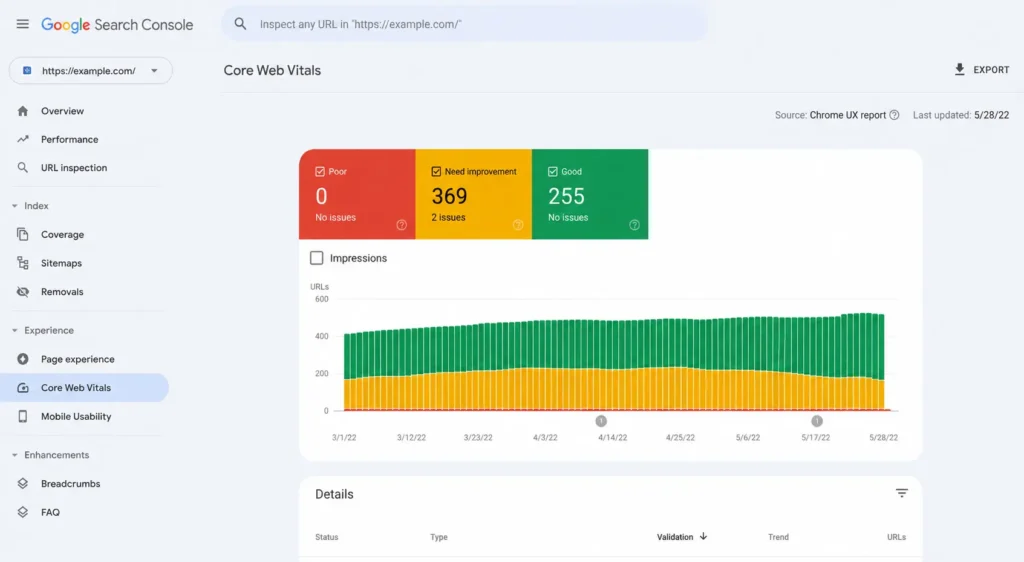
Google Search Console’s Core Web Vitals report groups your URLs by “Good,” “Needs Improvement,” and “Poor,” based on real CrUX field data — this is the same data Google uses for ranking, so it’s the one to trust over lab tools. PageSpeed Insights gives you both the field data and a lab test with specific recommendations tied to your actual code. For a full picture — not just the three headline metrics but everything feeding into your technical SEO health, from crawl issues to indexing gaps sitting alongside your speed problems — a proper Technical SEO Audit looks at Core Web Vitals as one piece of the larger picture, not in isolation.
Getting This Right Without Guessing
Most sites don’t have one Core Web Vitals problem — they have three or four small ones stacking together across different pages, different templates, and different third-party scripts, each contributing a little to a score that never quite crosses into “Good.” Finding all of them by hand, page by page, template by template, eats time most teams don’t have.
If you want it mapped out clearly — which pages are failing, which specific element is causing it, and what order to fix things in for the fastest ranking impact — reach out and we’ll walk through your site’s actual numbers with you. Call or WhatsApp 9718159724 to get started.
Frequently Asked Questions
. What is a good Core Web Vitals score in 2026?
A page is considered “Good” when LCP is under 2.5 seconds, CLS is under 0.1, and INP is under 200 milliseconds, measured across the 75th percentile of real user visits — not a single test run.
Do Core Web Vitals directly affect Google rankings?
They’re a ranking signal within Google’s broader page experience system, not a standalone ranking factor that overrides content quality. They matter most as a tiebreaker between pages of similar relevance.
Why does my PageSpeed Insights score differ from my Search Console Core Web Vitals report?
PageSpeed Insights lab data runs a single simulated test, while Search Console shows real field data collected from actual visitors over a rolling period. Field data is what affects rankings.
Can a fast website still rank below a slower one?
Yes. Content relevance, search intent match, backlinks, and topical authority carry far more ranking weight. Core Web Vitals mainly decide close calls between similarly relevant pages.
How often should Core Web Vitals be checked?
Monthly is a reasonable baseline for most sites, with a fresh check after any major template change, plugin update, or new ad network integration — those are the usual points where scores quietly slip.
Does mobile or desktop matter more for Core Web Vitals?
Google evaluates mobile and desktop separately, but mobile carries more practical weight since mobile-first indexing means Google primarily crawls and evaluates the mobile version of your pages.
What's the fastest Core Web Vitals fix for most sites?
Image compression and proper sizing usually delivers the quickest LCP improvement with the least development effort, especially on sites still serving uncompressed JPEGs or PNGs.
Do third-party scripts really affect INP that much?
Yes, significantly. Chat widgets, heat-mapping tools, multiple ad networks, and analytics scripts running simultaneously are one of the most common causes of poor interaction responsiveness.
Is Core Web Vitals a one-time fix or ongoing work?
Ongoing. New scripts, plugins, and content additions tend to reintroduce the same problems over time, so periodic re-checks matter more than a single optimization pass.
How does a Technical SEO Audit help with Core Web Vitals?
It identifies exactly which pages and elements are causing failures and places those fixes within the context of your site’s broader crawlability, indexing, and structural issues, so fixes are prioritized by actual ranking impact rather than guesswork.